Pay OUT H2F Integration
In this document, you may find the API methods for Payouts H2H integration of Pear2Pay.
(Authorization) Signatures
To authenticate requests securely, Pear2Pay requires
signatures included in the pear2pay-signature header.
Here's how it works:
-
Generate API Key and Secret:
- Create an API Key (Terminal) in the Merchant panel.
- Copy both the API Key and Secret immediately, as they are displayed only once.
-
Signature Verification:
- A signature is generated by hashing the request body using HMAC with your Secret Key.
-
The client sends the signature in the
pear2pay-signatureheader, and the server verifies it by re-computing and comparing signatures.
How to get signature from secret key:
Step 1: Generate Payout Invoice
To generate a payout invoice, use the following API method:
Endpoint:
POST
https://api.pear2pay.com/api/v2/payments/merchant/generate_payout_invoice/
Headers:
{
  "Content-Type": "application/json",
  "Authorization": "string", // API key
  "pear2pay-signature": "signature"
}
Payload:
{
  "currency": "RUB",  // Fiat currency code (ISO 4217 format)
  "client_id": "client123",      // External client ID provided by the merchant (optional)
  "order_id": "string",         // Order ID in your system
  "callback_url": "https://example.com/callback",  // URL to receive payment status updates (optional)
  "success_url": "https://example.com/success",  // Redirect URL on successful payment (optional)
  "fail_url": "https://example.com/fail",  // Redirect URL on failed payment (optional)
  "amount": "123.45"  // Amount
}
Response:
{
  "payout_invoice": {
    "created_at": "2025-04-09T09:10:07.186Z",
    "created_by": 0,
    "updated_at": "2025-04-09T09:10:07.186Z",
    "updated_by": 0,
    "id": 0,
    "uuid": "3fa85f64-5717-4562-b3fc-2c963f66afa6",
    "status": "CREATED",
    "amount": "123.45",
    "currency": "RUB",
    "crypto_amount": "string",
    "order_id": "string",
    "rate": "string",
    "fee": ".15",
    "success_url": "string",
    "fail_url": "string",
    "is_sum_changed": true,
    "payout_from_crypto": {
      "additionalProp1": "string",
      "additionalProp2": "string",
      "additionalProp3": "string"
    },
    "card_holder_name": "string",
    "payout_card_number": "string"
  },
  "paymentURL": "https://dev.invoice.pear2pay.com/payout/b851b455-59ec-4b58-8751-7e4ff71c1f3a"
}
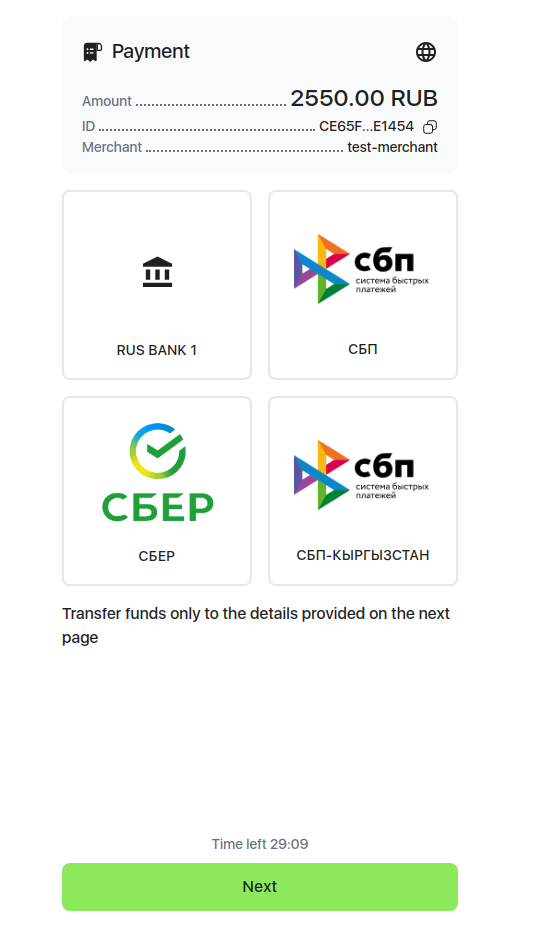
Step 2: Use Payment Form
A user-friendly and comprehensive form will open for you to fill in the required details.
Send the paymentURL to your clients so they can
continue the payment process. This link opens a form that will guide
your client step by step through the payment procedure, starting
with the selection of a payment method and continuing with the entry
of all necessary information. Each step is intuitive and
straightforward, ensuring your client has a seamless experience as
they proceed to the final stage of the transaction. Your clients can
use this form to make changes and complete their payment easily.
Callback
When the status of invoice is changed, the callback is sent to
callback_url
POST callback_url
Payload:
{
  "id": 326,
  "uuid": "3fa85f64-5717-4562-b3fc-2c963f66afa6",
  "status": "CONFIRMED",
  "amount": 1234.56,
  "currency": "RUB",
  "crypto_amount": 123.4,
  "order_id": "test_order",
  "rate": 100.0000,
  "fee": 0.0600,
  "success_url": "https://example.com/success",
  "fail_url": "https://example.com/fail",
  "is_sum_changed": false,
  "payout_from_crypto": true,
  "card_holder_name": "SOME NAME",
  "payout_card_number": "4174 5566 7788 9911",
  "created_at": "2014-10-16T15:11:52.135372Z",
  "created_by": 58,
  "updated_at": "2015-01-21T06:50:00.025354Z",
  "updated_by": 58,
  "signature": "signature"
}
Possible statuses for invoice:
Extra:
Check Payout Status
To check the current status of a payout, use the following API method:
Endpoint:
GET
https://api.pear2pay.com/api/payments/client/get_payout_invoice/:uuid/
URL Parameters:
-
uuid: The unique identifier for the payout invoice.
Response:
{
  "created_at": "2025-04-09T08:37:41.828Z",
  "created_by": 0,
  "updated_at": "2025-04-09T08:37:41.828Z",
  "updated_by": 0,
  "id": 0,
  "uuid": "3fa85f64-5717-4562-b3fc-2c963f66afa6",
  "email": "user@example.com",
  "name": "string",
  "status": "CREATED",
  "payout_card_number": "string",
  "currency": "RUB",
  "amount": "-1234.56",
  "crypto_amount": "-1902811451674344592.906",
  "expires_at": "2025-04-09T08:37:41.828Z",
  "success_url": "string",
  "fail_url": "string",
  "card_holder_name": "string",
  "comment": "string"
}